
測試demo code -> mmWave_Demo_Visualizer
要使用開發環境 -> MMWAVE-STUDIO
自C ++ 11起,在C ++中添加了基於ange的for循環。它在一定範圍內執行for循環。 用作與傳統for循環等效的可讀性更高的for循環,可在一定範圍的值上運行,例如容器中的所有元素。
// range-based-for.cpp
// compile by using: cl /EHsc /nologo /W4
#include <iostream>
#include <vector>
using namespace std;

int main()
{
    // Basic 10-element integer array.
    int x[10] = { 1, 2, 3, 4, 5, 6, 7, 8, 9, 10 };

    // Range-based for loop to iterate through the array.
    for( int y : x ) { // Access by value using a copy declared as a specific type.
                       // Not preferred.
        cout << y << " ";
    }
    cout << endl;

    // The auto keyword causes type inference to be used. Preferred.

    for( auto y : x ) { // Copy of 'x', almost always undesirable
        cout << y << " ";
    }
    cout << endl;

    for( auto &y : x ) { // Type inference by reference.
        // Observes and/or modifies in-place. Preferred when modify is needed.
        cout << y << " ";
    }
    cout << endl;

    for( const auto &y : x ) { // Type inference by const reference.
        // Observes in-place. Preferred when no modify is needed.
        cout << y << " ";
    }
    cout << endl;
    cout << "end of integer array test" << endl;
    cout << endl;

    // Create a vector object that contains 10 elements.
    vector<double> v;
    for (int i = 0; i < 10; ++i) {
        v.push_back(i + 0.14159);
    }

    // Range-based for loop to iterate through the vector, observing in-place.
    for( const auto &j : v ) {
        cout << j << " ";
    }
    cout << endl;
    cout << "end of vector test" << endl;
}
來源:https://docs.microsoft.com/zh-tw/cpp/cpp/range-based-for-statement-cpp?view=vs-2019

#include<iostream>
using namespace std;
void PrintAdd(int X,int Y){
cout <<"PrintIntAdd: " << X+Y << endl;
}
void PrintAdd(double X,double Y){
cout << "PrintdoubleAdd: " << X+Y <<endl;
}
int main()
{
PrintAdd(1,2);
PrintAdd(0.1,0.2);
cin.get();
return 0;
}
console output:
PrintIntAdd: 3
PrintdoubleAdd: 0.3

C# winform容器比較 panel ,TableLayoutPanel , FlowLayoutPanel , TableControl
panel
GroupBox
小結
panel跟GroupBox算是比較接近的控制項
最大的不同只有"TEXT"屬性而已,並且一開始就有分格線
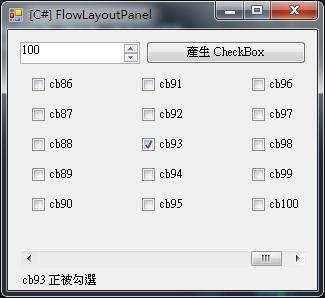
FlowLayoutPanel
FlowLayoutPanel 控制項會以水平或垂直流向來排列它的內容。 其內容可以從某一資料列換行至下一個資料列,或從某一資料行換行至下一個資料行。 此外,也可裁剪該內容而不換行。
借用別人的圖
TableLayoutPanel
比起TableLayoutPanel,內部可以做一些排版,以及放一些其他的控制項